


Ticketing solutions: why support is about more than handling complaints

Ask any managing director what their customer service department does and you almost always get the same answer: answering questions, handling complaints, solving problems. The service desk as the counter at the end of the chain.

ticket oplossingen
klantenservice software

How most organisations see support, and why that is too narrow

That picture is right, and it is also wrong. It is right because that really is the daily reality. It is wrong because in that view the service desk never does what it is actually capable of: informing the organisation. If there is one place in your business that knows what is going on with customers, it is customer service.

Which questions keep coming back? Which products cause the most tickets? Which customers escalate as a matter of course? Which problems could be solved internally but are experienced by customers as a shortcoming? Which questions are really sales opportunities? And which staff resolve issues fastest, how do they do it, and what can others learn from them?

That information sits in every service desk. But only when the service desk works as a system rather than as a shared mailbox.

A ticketing solution is the tool that makes that transformation possible. Not an admin system for complaints, but the central nervous system of your customer relationships.

What a ticketing system really does

The basic function is familiar: incoming questions are logged as tickets, assigned and tracked until they are resolved. But that is the starting point, not the end point.

  • The customer

    For the customer, the ticketing system is the difference between a question that disappears into someone's mailbox and a question with a number, an owner and a promised response time. That sounds administrative, but it decides how seriously a customer feels they are being taken.

  • The employee

    For the employee, the system is the difference between three screens and one. All the context sits with the ticket: the customer history, previous tickets, the contract, current deals, outstanding invoices. Drafting a reply takes minutes (or less) instead of a round of phone calls.

  • The team leader

    For the team leader, the system is the only way to see objectively how the team is performing: response times, resolution times, customer satisfaction scores, workload per employee and which ticket categories take the most time.

  • Management

    For management, the system is strategic input: which customer segments are the most labour-intensive, what does a recurring complaint cost in hours, and how does service quality relate to customer retention and renewal?

  • The organisation

    For the organisation, the system is a connecting point. Support knows that a customer is escalating; sales needs to know that before the renewal meeting. Support notices that a feature is missing; development needs to receive that information in a structured way. Support closes a ticket that is really a project; the project manager needs to see that. As long as those connections do not exist, everyone solves problems on their own island.

The support team as the hub, not the end of the line

  • The connection with sales

    A customer who has had three escalations in the past ninety days is a customer with a higher risk of cancelling. Your account manager does not know that, unless your systems tell them. Conversely, the service desk has no idea whether it is talking to your biggest customer or a trial account, unless the CRM shows it.

    Neither connection is complicated to set up, but they make the conversation fundamentally different at every customer interaction. Your service employee knows who they are dealing with. Your account manager knows where things stand before the renewal meeting. And your management can, for the first time, link service quality to customer retention.

  • The connection with projects

    Some of the tickets that come in are not support questions but work. A change, a configuration, an extension, a problem that needs an implementation step. If that work does not pass traceably to a project environment, it disappears into the service desk without anyone logging hours against it, watching a budget or reporting back to a customer.

    Organisations that set this up properly know how much of their service time is in fact project work that could have been invoiced.

  • The connection with development

    For software and technology companies, this is the most painful break. A customer reports a bug. Support assesses it, reproduces it and concludes: this is a defect. That defect goes to the development backlog by hand, and context is lost on the way. Development picks it up, fixes it, and the fix goes out in a release. And then nobody reports back to the customer who originally reported it.

    A well-configured system keeps that chain closed: the ticket stays visible, the status in development can be read from support, and when a release goes out the customers involved are informed automatically. That saves repeat contact and shows customers that their report was taken seriously.

The strategic layer

Once all the connections above are working, something new emerges: strategic information that cannot come from anywhere else.

You see which parts of your product consistently generate more questions than others: input for your product roadmap. You see which customer groups consume more service than they contribute in margin: input for your pricing. You see where service quality slips as you grow: input for your capacity planning. And you see the correlation between customer satisfaction in support and customer retention: the figure that proves your service desk is not just a cost centre.

AI in customer service: what it does and what it does not do

This is the layer that gives customer service teams the most direct time savings, provided you use it in the right way. AI does not replace the support agent. AI takes over the work that keeps the support agent from the work they are really good at.

What AI actually does in a ticketing environment:

  • Classifying and routing tickets

    An incoming ticket is read, classified by subject and urgency, assessed for customer sentiment, and automatically assigned to the right department or employee. That happens in seconds, even at three in the morning, even in six languages at once. Your people start the day with an ordered queue instead of a row of messages they first have to read through to know what awaits them.

  • Drafting replies

    Based on the content of the ticket and your own knowledge base, AI drafts a reply. The employee reads it, adjusts it where needed and sends it. That shift (from a blank screen to a draft reply in ten seconds) cuts handling time on simple questions by sixty to eighty per cent. Quality improves too: the reply is based on your own documentation and policies, not on what the employee happens to remember.

  • Fully resolving standard questions

    Questions about order status, invoice copies, password resets, opening hours, returns policy: with enough volume and a good knowledge base, AI handles these questions completely, without human involvement. Your people never even see those tickets. What remains in their queue are the questions that genuinely need human judgement: complaints with an emotional charge, complex technical problems, customers threatening to cancel.

  • Summarising conversations at handover

    When a ticket changes hands (because of a shift change, an escalation or a handover to a specialist), AI summarises the entire conversation history in a few lines. The next employee is up to speed straight away without having to read through twenty messages. That not only saves time but also stops customers having to tell their story all over again.

  • Monitoring sentiment

    AI reads not only the content of messages but also the tone. A customer who is starting to escalate (growing frustration across successive messages) is flagged before they pick up the phone or post a negative review. The team leader gets an alert and can step in proactively. That is the move from reactive to proactive, and it is what most organisations say they want but rarely actually do.

  • Spotting patterns

    A sudden spike in tickets on the same subject is almost always the sign of an outage, a bug in a recent update, or something unclear in your communication. AI detects that spike and reports it to the team before the flood of complaints begins. That not only saves customer contact but also shows what is really going on in your product or service: information that is valuable to development, marketing and management.

  • Generating knowledge articles

    Based on a resolved ticket, AI drafts a knowledge article for your help centre. Your employee reviews it and publishes it. That way your knowledge base grows with day-to-day practice, without someone having to set time aside for it.

Beeldscherm met het dashboard van een AI-agent in Zoho Zia Agents

Zia Agents: AI in Zoho Desk that works within your processes

The distinction that matters most for most organisations is not in the feature list but in the architecture. AI that sits on top of a mailbox only knows the contents of that mailbox. AI that runs inside your platform knows the full customer context: the contract, the deal, the invoice history, previous tickets, the customer segment.

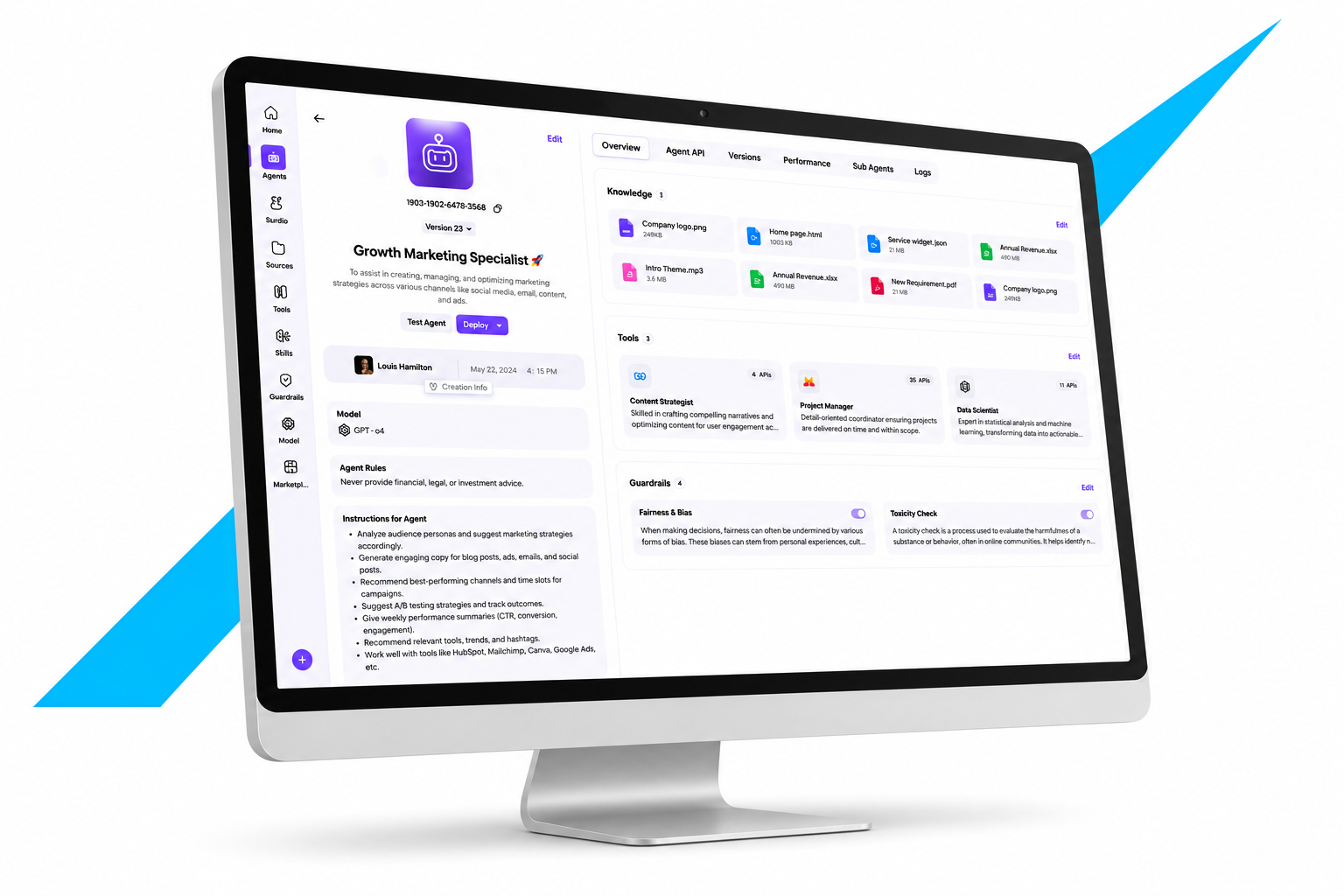
With Zia Agents you deploy autonomous AI agents that work inside your Zoho environment. They inherit the roles and permissions model you have already set up (an agent sees no more than the employee it acts on behalf of) and every action can be traced in your system log. You build them in Agent Studio from a description in plain language, add knowledge sources and tools, set guardrails and decide when the agent hands over to a person.

In customer service practice, that means an agent that independently handles order status questions for customers who log in to your portal, an agent that assesses every incoming email and sets the urgency before an employee sees it, and an agent that automatically informs the account manager with a summary of what is going on when a ticket escalates. All within the limits you have set.

What AI does not do

AI does not decide. Every reply is a proposal and every action a recommendation, unless you have deliberately authorised an agent to act on its own, and you only do that for strictly defined, predictable actions. The employee remains the owner of the customer contact. That is not just a technical limitation; it is the set-up that determines how much your team trusts the system.

Tickets now go automatically to the right person and the AI suggests a first reply. Our response time has become noticeably shorter.

Sample quote Real customer quote to follow

Two platforms, two strengths

Zoho Desk

Zoho Desk is the choice when you want to embed support in a broader customer platform. Email, phone, chat, WhatsApp, social media and your customer portal come together in one ticket stream. SLAs per customer or contract, routing by subject or department, escalation when deadlines are missed and a knowledge base for self-service: all of that comes as standard in the platform.

Its strength lies in the integration with the rest of the Zoho suite. The account manager sees open tickets in their CRM screen. The service desk sees the deal and contract information with the ticket. A bug goes to Zoho Sprints or Zoho Projects in one click, with the context attached. And Zia Agents take over routine questions completely, within the permissions and limits you set, with the customer profile, order history and contract information as context.


Creatio Service

Creatio Service is the choice when service processes are complex: several service levels per customer, cases that run for weeks or months, service contracts with their own escalation paths, and the need to model and adjust service processes in the same way as business processes elsewhere.

Creatio's no-code process designer means service and case workflows can be adjusted by people from the business, without a developer. Dynamic case management handles cases that have no fixed path but do need the right steps at the right moment. And the AI layer through Creatio AI Studio lets agents take part in the service process: from classifying and drafting replies to starting a formal follow-up procedure.

When do you choose which?

Your situation Most likely
You want to embed support in a broad customer platform Zoho Desk
You already work in Zoho Zoho Desk
Simple to moderately complex service processes Zoho Desk
Complex service processes with several service levels Creatio Service
Case work where the path is not fixed Creatio Service
Service processes you want to adjust yourself without code Creatio Service
You want independent advice on which fits best Us
Twee collega's bekijken samen een klantenportal op een laptop

Why your selection starts with your processes

The most common misunderstanding when choosing a ticketing solution is that the selection is about features. The right questions are:

What do your service levels look like, per customer segment? What is going wrong structurally right now, and is that a system problem or a process problem? Which connections do you need to CRM, projects, development and your customer portal? Who has to work with it, and in which language? What do you want to be able to report on a year from now, and which data model follows logically from that?

These are the questions we ask before we mention a platform.

Why you bring in Mobile XL

We are a partner of both Zoho and Creatio and work with both platforms every day. That puts us in a position to advise independently, and to be honest when your situation calls for a specific solution.

Our scope goes beyond the service desk alone. We understand how your ticketing system connects to your CRM, your project environment, your development set-up, your integrations and your reporting needs, because we implement and manage all of those as well. We also build AI agents that take part in your service process, with the governance around them that satisfies an auditor or the board.

Why larger organisations need a different kind of guidance

We run this kind of project with our own development team on board. That means a question that falls outside the standard does not end in a no, or in a separate system next to your service desk.

  • Several departments with their own service levels

    A technical support team works differently from a customer service team for billing questions. Those departments belong in the same system, with their own rules, their own reports and their own escalation paths.

  • Volume and prioritisation

    At a thousand tickets a week, prioritisation is not a manual task but an algorithm that takes account of contract value, customer status and remaining SLA time.

  • Governance over who can do what

    Who closes tickets, who may change an SLA, who sees another department's tickets? You build that model up front, not after the data is in.

  • AI governance

    Which agents may act on their own, for which customers, with which permissions? And how do you show afterwards what was decided? You have that conversation before the rollout, not after it.

  • Procurement and security

    Security reviews, DPIAs, data processing agreements, questionnaires from procurement. That needs someone who speaks that language.

  • Change management

    A team that has worked by email for years will not switch to a ticketing system by itself. Key users, training and a communication plan decide whether it is still being used after three months.

Why international activities need separate attention

  • Languages and time zones

    Your customer service team spreads out, but the reporting has to add up. Response times across time zones call for a well-thought-out SLA set-up, in which AI can provide part of the 24/7 cover for the categories that can be handled fully automatically.

  • Regional service levels

    Not every country has the same expectations or contractual obligations. The system configuration has to be able to handle that variation.

  • Data storage per region

    Which customer data is stored where, and what does that mean for customers in countries with specific legislation?

  • One team or several?

    Central customer service with local handover, or fully distributed teams? That choice determines how you set up routing.

  • Rollout across countries

    Local key users, training in the right language and a rollout sequence that takes account of who learns from whom. We work in Dutch and English.

The sum most managing directors do not see

Poor support costs money in two ways. The first is visible: the hours it takes to answer questions and solve problems. The second is invisible: the revenue you miss because customers drop out, do not renew, or share their negative experience with others.

The second cost is almost always bigger than the first. And it can only be measured when you have a system that tells you when a customer is dissatisfied, how long that dissatisfaction has been going on, and whether there is a pattern to it.

A ticketing solution is the foundation for that. Zoho Desk with Zia Agents or Creatio Service are the platforms that can form that foundation. And we are the partner that helps you choose, set it up and make the connections that turn the service desk from a cost centre into a source of information.

Customer succes manager met headset in gesprek met een klant

Frequently asked questions about ticketing solutions

  • A shared mailbox remembers nothing. A ticketing system remembers everything: who asked the question, what was discussed before, whether an SLA applies, who picked up the ticket and how long it has been open. That sounds administrative, but it is the difference between a customer who has to tell their story again every time and a customer who notices that you know their situation.

  • AI classifies and routes tickets automatically, drafts replies from your own knowledge base, handles standard questions entirely on its own, summarises conversations at handover, monitors sentiment and flags escalation risk, detects spikes that point to an outage, and generates draft knowledge articles from resolved tickets. In every case the employee keeps final responsibility; AI is a more productive colleague, not a replacement.

  • No. A well-configured ticketing system provides information for sales (which customers are dissatisfied ahead of the renewal meeting), for management (which service categories take the most time), for development (which bugs and requests are reported most often) and for projects (which tickets are really project work). The service desk as a source of information for the rest of the organisation is the biggest value that most organisations leave on the table.

  • Zoho Desk is strong when you want to embed support in a broader customer platform with CRM, marketing and projects in the same environment, with Zia Agents as an AI layer that works on the full customer profile. Creatio Service is strong for more complex service processes with several service levels, long-running cases and the need to adjust service processes without code, in the same way you do with other business processes.

  • Technically not big; in terms of adoption, sometimes considerable. Your team is used to a mailbox and will be learning something new. That works if the interface is better than what they have now, if the benefits are visible in their daily work (AI support that saves time straight away helps enormously here) and if there is training and there are key users. We usually set up the technology in a day; we support the adoption over weeks.

  • By working in layers. Start with AI that only drafts replies for an employee to review. Only move to fully independent handling for the categories where the AI consistently produces good output and where a mistake carries limited risk. Set guardrails that determine what the agent may and may not say, define a clear handover to a person when in doubt, and monitor actively. An agent you trust has earned that trust because you have tested it.

  • Yes. We set up Zia Agents as part of a Zoho Desk implementation, including the knowledge sources, the guardrails, the permissions per agent type and the governance agreements on who may change which agents. The same applies to Creatio Service through AI Studio. Our own development department also builds custom integrations for organisations whose AI agents need to work with systems outside the Zoho or Creatio environment.

  • A well-defined implementation for one support department with one or two channels and basic SLAs is usually up and running within a few weeks. Add several departments, complex service levels, integrations with CRM and development, AI agents and a migration of existing ticket history, and that grows to months. The technology is rarely the bottleneck; agreeing SLAs, routing rules, escalation paths and AI permissions is.

Want to know which system suits your situation?

And what AI support is realistic for your team? Mobile XL advises independently and handles the complete implementation.