Zoho Zia Agents: digital colleagues that work inside your own systems

What are Zia Agents and what can you do with them? A look at the Agent Store, Agent Studio, agents per department, Zoho MCP and the connection with Claude, ChatGPT and your own language models.

Twee collega's bekijken samen een klantenportal op een laptop
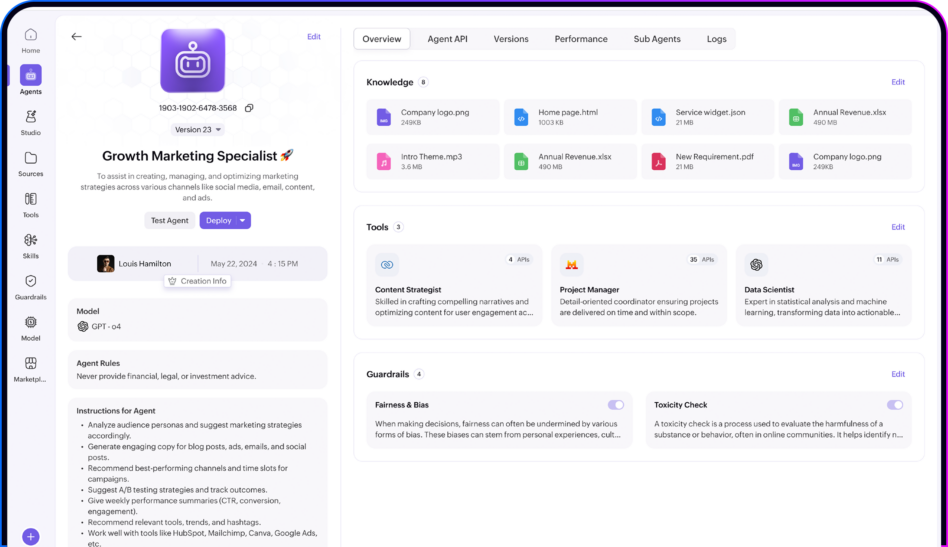
zoho zia agents dashboard

The difference between an assistant and an agent

AI in business software has gone through three phases in a short space of time. First there were chatbots with decision trees. Then came assistants that suggested something and waited for you to press send. Now there are agents: they get an assignment, work out which steps are needed, carry them out in your systems and report back.

That last part, "carry out", is what it is all about. An assistant writes a draft reply. An agent answers the ticket, updates the record, assigns a task to the right colleague and closes the case. Within the limits you have set, with the permissions you have granted.

Zoho Zia Agents is the platform you use to set this up inside the Zoho environment where your business data already lives. That is an important distinction: the agent comes to the data, instead of you copying your data into an AI tool.

How the platform is built

  • Agent Store

    A catalogue with a large number of ready-made agents for familiar roles: SDR, account manager, customer service, IT helpdesk, HR, sales coach and more. You deploy them in a few clicks in the Zoho app of your choice and adapt them afterwards. This is usually the best place to start, because you see what a well-designed agent looks like before you build one yourself.

  • Agent Studio

    The build environment. You describe in plain language what the agent should do and Zia helps with the configuration, or you set everything up manually. You add knowledge sources, connect tools and APIs, define guidelines and guardrails, and decide which other agents it may work with.

  • Multi-agents

    Agents do not have to do everything on their own. You can combine them in a hierarchy in which a coordinating agent hands off subtasks to specialised agents. For compound processes (think of a quote request that involves a credit check, a stock check and pricing) that works better than a single agent that has to be able to do everything.

  • Knowledge Base

    The documents, manuals and policies agents draw their answers from. This determines the quality of your agent more than any setting: an agent that draws on outdated documentation gives outdated answers.

  • Tools and Connections

    API collections that let agents actually do something in your systems, and authenticated connections to Zoho apps and external services.

  • Permissions and roles

    Standard roles determine who may view, build, test, deploy and manage agents. That is no side issue: it is the difference between a controlled rollout and fourteen agents nobody knows the origin of.

What agents do per department

Sales in Zoho CRM

In Zoho CRM, agents take over the work that keeps salespeople from selling. Qualifying and enriching incoming leads based on your own criteria, updating CRM fields after a call, sending follow-up emails in line with your cadence, preparing quotes with the right pricing agreements, and flagging deals that have gone quiet.

What comes next is more interesting: an agent that analyses your pipeline and explains exactly why your forecast is off, or that points out accounts with an increased churn risk based on ordering behaviour, contact frequency and open tickets. That last one is only possible because the agent can also see your service data.


Service in Zoho Desk

In Zoho Desk the gain is biggest, simply because the volume is highest. Agents classify incoming tickets by subject, language, urgency and sentiment and route them to the right department. They draft replies from your knowledge base with sources, so your colleague only has to check and send. Standard questions (order status, a copy of an invoice, a password reset, a change of address) they handle entirely on their own.

On top of that they do something people are bad at: spotting patterns. A sudden spike in similar reports almost always points to an outage or a failed release, and an agent flags it before the flood of complaints starts.

HR in Zoho People

In Zoho People, agents answer the questions HR departments spend most of their time on: leave balance, policies, the collective labour agreement, how to apply for parental leave, what the study cost scheme covers. They keep track of onboarding tasks, flag that a probation period or fixed-term contract is ending before the notice deadline passes, and report rising absence or turnover in a specific team.

What applies to all agents applies even more here: HR works with the most sensitive data in your organisation. Because agents run inside the platform, they inherit the role model you have already set up.

Recruitment in Zoho Recruit

In Zoho Recruit, agents pre-sort applications on hard, predefined criteria, schedule interviews, keep candidates informed and flag vacancies that get stuck in a particular stage. That last point is more valuable than it sounds: if candidates consistently drop out between the first and second interview, the problem lies in your process and not in the market.

Keep one thing in mind here: in selection you are dealing with automated decision-making about people. Keep agents in this role strictly to pre-sorting on objective criteria and leave the assessment to people.

Customer succes manager met headset in gesprek met een klant

Across departments

The real added value comes when an agent works across several apps at once. An agent that sees a customer has three escalations open while the renewal is due in six weeks is combining data from Desk and CRM.

That is information that simply does not exist in a landscape of separate tools, and it is the reason agents inside a suite perform differently from agents on top of a chat interface.

Building your own agent

In practice the route in Agent Studio is short. The technology usually takes less time than steps 1 and 2: getting clear on exactly what the agent should do and cleaning up the knowledge source is the real work.

  1. Describe what the agent should do

    In plain language, including what it must not do.

  2. Connect knowledge sources

    Manuals, policies, product documentation, knowledge base articles.

  3. Add tools

    Predefined or custom APIs the agent uses to carry out actions in your systems.

  4. Set up guardrails

    Against unwanted or incorrect output, and define when a person takes over.

  5. Decide the permissions

    On behalf of which role does the agent work, and what may that role see and do?

  6. Test in a sandbox

    Before you roll out.

  7. Choose how to deploy

    As a digital employee in a Zoho app, with its own name and role, or as a background connection that processes call on.

Ondernemer werkt aan een laptop in een kantoor met bakstenen muur

Zoho MCP: the bridge to and from other AI platforms

This is the part most organisations overlook, even though strategically it is the most interesting.

Zoho MCP is Zoho's implementation of the Model Context Protocol, the open standard that lets AI models talk to external systems in a uniform way. It works in two directions.

  • Inbound: external AI clients working in your Zoho data

    In the Zoho MCP console you create an MCP server, select which tools you make available, authorise it and copy the server URL. You paste that URL into an AI client, after which that model can search records, update data, send emails and carry out actions across several Zoho products. Supported clients include Claude, ChatGPT, Cursor, Windsurf, VS Code with GitHub Copilot in agent mode, Zed, Continue, Cline and n8n. That is practical for anyone who prefers to work in their own AI environment but still needs the business data. An analyst running a pipeline analysis on real CRM data in Claude, for example, without exports.

  • Outbound: Zia Agents calling external systems

    Agents can in turn use external MCP servers and models, so an agent in Zoho can also do something in a system outside the platform.

  • Why this matters

    The biggest objection to AI agents in business software is vendor lock-in: you build your processes on one supplier's AI. MCP takes the sting out of that. Your Zoho data and your processes stay where they are, but which model works on top of them is your choice, today and in two years' time.

  • One warning when setting it up

    Anyone with your MCP server URL can connect a client to it. Treat that URL as a login credential, start with read-only tools, and only extend to write permissions once you know exactly who has access.

Which models run underneath

By default, Zia Agents run on Zoho-hosted language models developed specifically for business use and covered by Zoho's own privacy and security policy. You can also configure other model providers and work with your own key, so you decide which party processes your data.

For Dutch organisations that is no detail. In healthcare, education, government and financial services, the question "where is this processed and by whom" decides whether a project goes ahead. When setting things up, check which data centre region you use and which model configuration goes with it.

Governance: where it gets stuck in practice

Not on the technology. On agreements.

  • Authority

    Define per agent what it may handle on its own and where a person takes over. A refund of fifteen euros is not the same as cancelling a contract.

  • Data quality

    An agent is only as good as the knowledge source it draws on. Outdated documentation and duplicate records produce unreliable agents.

  • Ownership

    Who is responsible if an agent does something wrong? Appoint an owner per agent and agree who may change it.

  • Lifecycle

    Version control, testing before publication, and a way to phase out an agent without processes falling over.

  • Preventing shadow AI

    The risk is rarely the one well-thought-out agent. It is the fourteen that employees created themselves because it was so easy. One central environment with roles and approval solves that.

The Zia Agent answers a large share of the simple questions itself and passes the rest to our team with a summary. Customers get an answer faster.

Sample quote Real customer quote to follow

What it costs

Zoho charges for the use of agents, not for their existence. An agent that sits idle costs you nothing.

Billing works through credits based on what the agents actually carry out, which means you can start with one process and only scale up once it works.

No development costs

That fits the way Mobile XL works: we do not charge for developing standard or custom agents, only for their use.

No upfront budget

No development budget in advance, no invoice for an agent that turns out not to fit.

Team in overleg rond een bureau met laptops op kantoor

Start with one task, not with the technology

Most AI projects get stuck because they start with the question "what can we do with AI" instead of "which work costs us the most time and is the most predictable". Choose one process with enough volume and clear rules, build an agent for it, let it shadow your team with draft replies first, measure what it delivers, and only then expand.

You can do that in Zoho CRM, Zoho Desk, Zoho People or Zoho Recruit, with Zia Agents as the build environment and Zoho MCP as the bridge to the AI tools your team already uses outside it.

Medewerkster werkt geconcentreerd achter een laptop op kantoor

Frequently asked questions about Zia Agents

  • Zia is Zoho's AI layer that has been part of the applications since 2015: predictions, anomaly detection, suggestions and the conversational assistant Ask Zia. Zia Agents is the agentic extension of that: autonomous digital employees that carry out tasks on their own instead of only suggesting something. Zia advises, an agent acts.

  • Both. The Agent Store has more than a hundred prebuilt agents for roles such as SDR, account manager, customer service and IT helpdesk that you deploy in a few clicks and then adapt. You build your own in Agent Studio when you have a process that is specific to your organisation. In practice it is best to start with an existing agent, because then you see what a good setup looks like.

  • Zoho MCP is Zoho's implementation of the Model Context Protocol, which lets external AI clients such as Claude, ChatGPT, Cursor and VS Code work directly with your Zoho data and actions. You create an MCP server, choose which tools you make available, and connect it to your AI client. The other way round, Zia Agents can call external MCP servers. The big advantage is freedom of model choice: your processes stay in Zoho, but you decide which model runs on top.

  • By default, Zoho-hosted models developed for business use and covered by Zoho's privacy and security policy. You can also configure other model providers and work with your own key. When setting up, check which data centre region you use: for organisations with EU requirements on data storage that is often the deciding question.

  • Because Zia Agents run inside the Zoho platform, your data stays where it already was and the agent inherits the role and permission model you have set up. An agent sees no more than the user on whose behalf it works, and every action can be traced in the log. That is structurally a simpler story than a standalone agent in an AI tool, where you introduce an extra processing step and an extra place holding personal data.

  • Yes, agents work with language models and those are probabilistic. That is why you work with guardrails, clearly defined authority and a clear handover to a person when in doubt. Responsibility stays with your own organisation, not with the supplier. Appoint an owner per agent, monitor actively and start with agents that make suggestions before you let them act on their own.

  • Zoho charges for the use of agents, not for the number of agents you have, through a credit system based on what they actually carry out. That makes it possible to start small. On top of that, allow for the preparation costs: cleaning up knowledge sources, documenting processes and bringing employees along.

  • A ready-made agent from the Agent Store is deployed in hours. A custom agent for a well-defined process is a matter of days. The lead time is determined by something else: sharply defining exactly what the agent should do, cleaning up the knowledge source it draws on, and defining its authority. Expect that to take most of the time.

Curious which agent will deliver results fastest for you?

Mobile XL builds standard and custom AI agents on Zoho, and you only pay for their use.