

Zoho Desk RPA integration: how Chubb Fire & Security runs its service desk from one screen
A customer calls about a fault in their fire alarm system. In the past, the service employee would then start searching through five different systems. Now everything is in Zoho Desk, and one click opens the customer record in every management application. That saves around 20 minutes per ticket.

The challenge
For every customer question, the service department had to search five systems. Customer details were in the ERP. Technical information about the installation was in one of the management applications. And the history of earlier reports was somewhere else again.
That cost time on every ticket. A service employee had to log in, search, copy and compare before they could really help the customer. In an organisation with so many customers and installations, that adds up fast.
20 min
Saved per ticket, because one click opens the customer record in every management application.
1 screen
The service desk works from Zoho Desk instead of five separate systems.
8 mths
From February to October 2026, built in four building blocks.
100,000+
Businesses in the Benelux rely on Chubb for their security.

From five systems to one screen
Mobile XL is a Dutch partner for digital transformation. We help organisations in the Netherlands and Flanders with Zoho, process automation and low-code solutions. For Chubb Fire & Security we built a Zoho Desk RPA integration that connects the service desk to the ERP, the management applications, the telephony and a custom QR application.
In this customer story you can read how that solution works. You'll see how engineers register new installations with a QR code, how customers use that same QR code to report a fault and how RPA takes the searching off the service employee's hands.
About Chubb Fire & Security
Chubb Fire & Security has specialised in security for more than 200 years. In the Benelux, more than 100,000 businesses rely on Chubb for fire protection, intruder alarms, CCTV, access control and alarm receiving centre services.
Its customers are diverse: from SMEs and retail to data centres, healthcare institutions, financial institutions and critical infrastructure. Worldwide, Chubb has around 12,000 employees working from more than 200 locations.
For an organisation of this size, service is a core process. Countless installations are in place at customer sites, and they need to be maintained and quickly working again after a fault. Every minute a service employee spends searching comes at the customer's expense.
Eight months, four building blocks
The project ran from February to October 2026. We built it in four steps.
Finding the right RPA solution took extra time. Chubb's management applications place special demands on automation. By acting quickly we solved that relatively fast, and with Collabotics we found a solution that fits.
-
Zoho Desk
The central service environment for all customer questions and faults.
-
The QR application
On Zoho Catalyst, for registering installations and reporting faults.
-
The RPA solution
With Collabotics, which drives the management applications and the telephony from Zoho Desk.
-
The ERP integration
Via SFTP, exchanging tickets and installation data between Zoho Desk and the ERP.
Five systems per customer question
Objective: all data synchronised and up to date
The core of the assignment was clear. All data had to be synchronised between the applications and always be up to date. That led to the concrete goals.
| Area | Objective |
|---|---|
| Service desk | One central environment in Zoho Desk instead of five systems |
| Installations | Every device or installation clearly identifiable through its own QR code |
| Faults | Customers report a fault in seconds by scanning a QR code |
| Management applications | Open the customer record in every application with one click from Zoho Desk |
| Telephony | Call the customer back with one click from Zoho Desk |
| ERP | Tickets to the ERP and new installation data back to Zoho Desk every day |
The solution: Zoho Desk as the control centre
In the new situation, Zoho Desk is the control centre of the service desk. Zoho Desk drives all the other systems. Searching is no longer needed, because the right information comes to the service employee.
How the processes work in practice
The solution supports three processes: registering a new installation, reporting a fault and handling a ticket. Zoho Desk plays the leading role in each of them.
-
Registering a new installation with a QR code
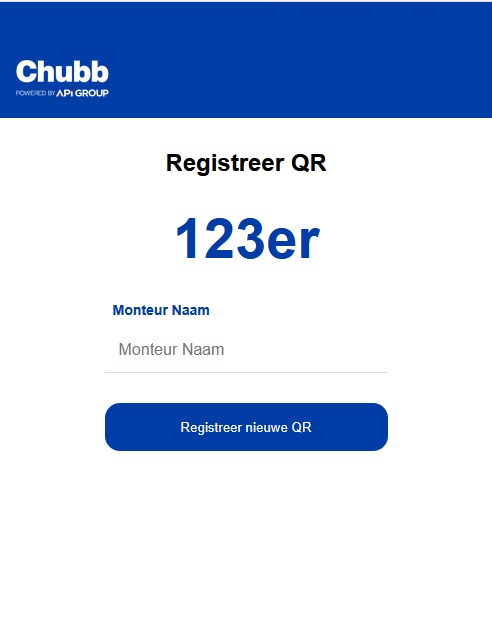
- The engineer scans the QR code on the new installation with the QR app on their phone or laptop.
- The QR code is recorded in Zoho Desk.
- The engineer calls the support department.
- The service employee links the project to the QR code in Zoho Desk.
- The service employee adds the exact location: the building, the floor and the room where the equipment is.
- All information is fed back to the ERP system.
From that moment on, the installation is clearly identifiable. Anyone who scans the QR code ends up at exactly this device in exactly this place.
-
Reporting a fault with a QR code
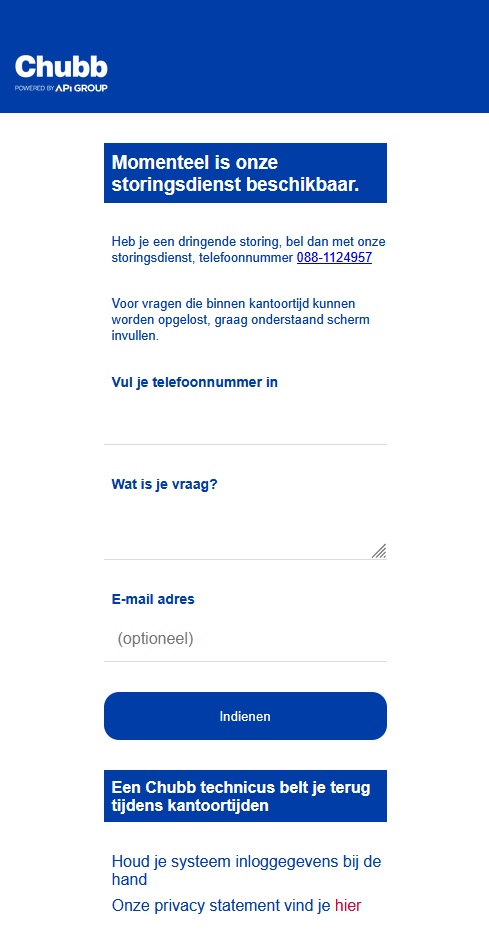
- The customer scans the QR code on the device with their mobile phone.
- The customer enters their mobile number.
- A report comes straight into Zoho Desk, linked to the right installation, customer and location.
- The service employee calls the customer back on the number provided.
So the customer doesn't have to explain which device it is or where it is. Chubb already knows the moment the report comes in.
-
Handling a ticket with one click
- The service employee opens the ticket in Zoho Desk and sees the customer, the installation and the location.
- With one click, Collabotics RPA opens the customer record in the management applications, such as AJAX and ATS.
- With another click, Collabotics calls the customer back through the VoIP environment.
- The ticket goes to the ERP system through the ERP integration.
Searching five systems is a thing of the past. That saves around 20 minutes per ticket.
Zoho Desk ERP integration via SFTP
The integration with the ERP system runs through SFTP servers. The exchange works in both directions.
Every ticket from Zoho Desk goes to the ERP system. In the other direction, Zoho Desk receives all data on new installations every day. That way all customer and system information reaches Zoho Desk from the ERP. The integration runs through Mobile XL's integration platform on Zoho Catalyst.
RPA integration with Collabotics
Not every management application has a modern API. That is exactly where RPA comes in. From Zoho Desk, Collabotics carries out the actions a service employee would otherwise do themselves: logging in, searching and opening the right customer record.
Chubb's management applications have special requirements. That is why we chose the RPA solution carefully. With Collabotics we found a solution that works reliably with applications such as AJAX and ATS, and with the VoIP environment as well.
Results of the Zoho Desk RPA integration
After eight months, Chubb's service desk works from one environment. These are the main outcomes.
-
One environment
The service desk works from Zoho Desk instead of five separate systems.
-
20 minutes per ticket
One click opens the customer record in the management applications, saving around 20 minutes per ticket.
-
Call back with one click
With one click you call the customer back through the VoIP environment.
-
Every installation identifiable
Every device and every installation is clearly identifiable through its own QR code, including the exact location.
-
Report a fault with a scan
Customers report a fault by scanning a QR code and entering their mobile number.
-
Connected to the ERP
Tickets go to the ERP and Zoho Desk receives the data on new installations every day.

What this means for Chubb and its customers
The time saved, 20 minutes per ticket, is the most visible result. That time now goes into helping the customer instead of searching. With a large number of tickets, it adds up to a substantial capacity gain for the service desk.
The quality of the service has improved as well. Because the QR code links the installation, the customer and the exact location, the service desk knows immediately what it is about. That prevents misunderstandings and makes handling faster and more accurate.
It has become easier for the customer too. Scan, enter a number, done. No forms, no explaining which device it is. That lowers the threshold for reporting a fault straight away, and that is exactly what you want with fire and security installations.
Finally, the data is up to date everywhere. The ERP and Zoho Desk are synchronised with each other, so everyone works with the same information.
Want to automate your service management too?
Does your service desk also work with several systems at once? With a smart Zoho Desk integration you bring everything together on one screen. Whether it is an ERP integration, RPA or a custom app on Zoho Catalyst: Mobile XL helps you from analysis to go-live. Also see how we helped CAST and Friesland IT with process automation.




Frequently asked questions about the Zoho Desk RPA integration
-
A Zoho Desk integration connects your service desk to other systems, such as an ERP, management applications or telephony. That lets you work from one screen, and you no longer have to search in separate systems.
-
The customer scans the QR code on the device and enters their mobile number. A report comes straight into Zoho Desk, linked to the right installation and location. The service desk then calls the customer back.
-
Yes. The QR application runs on Zoho Catalyst and works on mobile devices and on laptops. So engineers and customers use the same app, each for their own purpose.
-
No. The customer scans the QR code and only enters their mobile number. Because the QR code is already linked to the installation, the customer and the location, no other information is needed.
-
The engineer scans the QR code, which is recorded in Zoho Desk. The service employee then links the project to the QR code and adds the exact location, such as building, floor and room. That information also goes to the ERP.
-
Yes. At Chubb, the Zoho Desk ERP integration runs through SFTP servers. Tickets go to the ERP and Zoho Desk receives the data on new installations every day.
-
RPA stands for robotic process automation. Software then carries out actions an employee would otherwise do themselves, such as logging in and searching in an application. From Zoho Desk, Collabotics RPA opens the customer record in the management applications with one click.
-
Without RPA, a service employee had to search five systems for every question. With the RPA integration, one click opens the right customer record in every application. The searching disappears, and that saves around 20 minutes per ticket.
-
Yes. Collabotics is linked to Chubb's VoIP environment. From the ticket in Zoho Desk you call the customer back with one click.
-
The QR application and the integration platform run on Zoho Catalyst. As a result, hosting, security and GDPR safeguards fall within Zoho's infrastructure. The exchange with the ERP runs through secure SFTP connections.